First of all, I must say this is an informative guide only. I do not recommend doing this.
Also you must have a Jailbroken Device.
1. Open Cydia
2. Go to Sources, Edit, Add
3. Enter http://hackulo.us/
4. Search "AppSync"
5. Select and Install Correct Version matching Your iOS
- To find your iOS version, go to settings > general > about > look for version
For device only skip to step 12. For Device and computer continue to step 6.
6. On Your Computer Go to http://apptrackr.org/
7. Search For the App You Want
8. Scroll Down and Click a Download Link.
9. When download has finished, move file into your iTunes Library
- This location may vary for some but mine is Music > iTunes > iTunes Media > Mobile Apps
10. Double Click the Downloaded File to Add it to Your iTunes Library
11. Sync for Device
If you want to know how to do this without your computer keep reading
12. Back on Cydia Searc Intallous and Download That
13. Go to Your Home Screen and Open Installous
14. Search the App You Want and Touch Download
15. Touch a Download Link
16. When it is Finished It Should then Install
WARNING: The apps that you download on your device only will be erased when syncing your device.
To avoid this, either use steps 6 - 11 first or before syncing follow steps 6 - 11 to keep the apps from being erased.
Just remember I do not recommend doing this and this is only for information.
Showing posts with label iTunes. Show all posts
Saturday, March 31, 2012
How to Get Free iOS Apps
Labels:
app,
apple,
apps,
free,
fun,
game,
games,
gnome tech,
guide,
how to,
iOS,
iPad,
iPhone,
iPhone iOS,
iPod,
iTunes,
phone,
tablet,
tech,
technology
iPhone and iPad Game of the Week: Fibble
Fibble - $1.99 iPhone, 4.99 iPad
Fibble is very fun game by Crytek GmbH. It is kind of a strategic mini-golf type game. The object is to get the Orange blob thing into the hole. You do this by putting your finger on the blob and pulling it back and releasing. The blob runs into other characters throughout the course which help you to get closer to the goal. You can collect coins and stars to increase your score. Each level has a different goal, for example, complete the level in one flick and get at least 68,000 points. The graphics are very nice but not perfect. It is a very creative game and makes you want to keep you playing. If you are willing to pay a little bit of money then pic up this app for lots of fun!
Labels:
app,
app of the week,
apple,
apps,
fibble,
fun,
game,
games,
gnome tech,
iOS,
iPad,
iPhone,
iPod,
iTunes,
mobile,
phone,
tech,
technology
Friday, March 30, 2012
iPhone App of the Week: Snapguide
Snapguide - Free
Snapguide is a free application made by Heavy Bits. It is a huge database of how to guides made by people just like you and me. When you open the app you are presented with a couple slides about the app. The app allows you to sign in with your Facebook or Twitter which is always a nice feature. The how to guides range from origami to making beeswax and honey lip balm. You can even create your own guides right one the app! You guides can be liked or shared through social networks. You can also be followed, or follow other guide makers. It has a search feature in order to find exactly what you want. The amount of guides is not huge but it is growing everyday. This is a very useful app to learn news things and to teach other people.
Labels:
app,
app of the week,
free,
fun,
gnome tech,
guide,
how to,
iOS,
iPad,
iPhone,
iPod,
iTunes,
snapguide
iPad App of the Week: Paper By FiftyThree
Paper By FiftyThree - Free
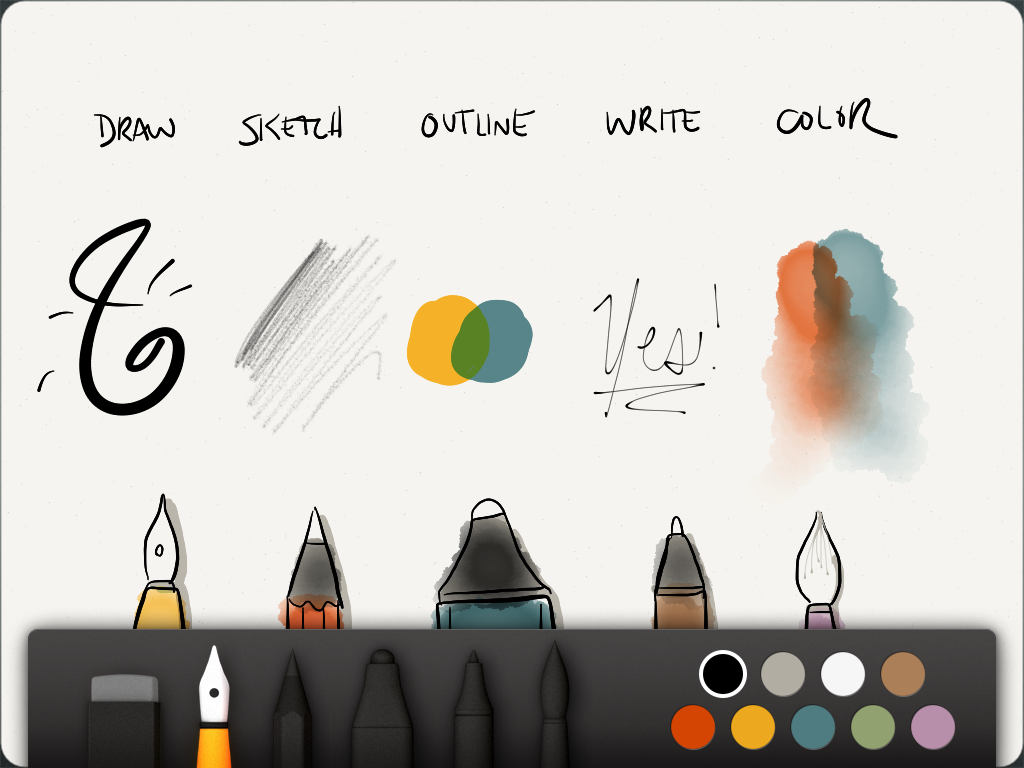
Paper is a drawing application made by a company called FiftyThree. When you first open the app you get some simple directions on how to use it. After that you are presented with three books. One it called Making Paper, the next is called Ideas, and the last is called Sketches. Ideas and Sketches are empty and are ready for you use. You have to ability to create new books or erase preexisting books. When a book is touched it opens to show a very nice presentation. The first book contains somewhat of a tutorial. This app flows and feels very nice. You can use five different brushes to create your drawings or sketches. Here is the only bad thing about the app, it only comes with one brush. The other tools for sale for $1.99 each. The five brushes are called draw, sketch, outline, write, and color. This is a very nice application that artists will love and for the price of free it wont being burning a hole in your pocket unless you some extra brushes. Tell us what you think about this app in the comments below and dont forget to follow us!
Labels:
app,
app of the week,
apple,
draw,
drawing,
free,
fun,
gnome tech,
iPad,
iPhone,
iPod,
iTunes,
tech,
technology
Monday, March 26, 2012
Spotify - The Best Way to Listen to Free Music!
Do you like listen to music? Do you hate paying $1.29 for each song you buy? Would you rather listen free? If you answered yes, yes, or yes, then Spotify is for you! Spotify streams music to your computer for absolutely no cost. It is like combining Pandora with iTunes except it takes away the most annoying features of both. No more wasting money on songs and you get to pick every song you listen to! I personally use this everyday. I just type in a song and seconds later I am listening to it. Spotify also automatically syncs the music that is already on your computer so it is easily accessed right along with your streaming music. Here is the catch, an ad is played every one and a while. Also you are limited to only ten hours of streaming per month after six months of use. But you are getting FREE music! There is an option to pay $4.99 per month for no ads and unlimited streaming. Also another option is $9.99 per month for premium use. This includes mobile use, no ads, unlimited streaming, and offline mode. Offline mode is one of the coolest features ever. Spotify allows you to store 3,333 songs on each of your devices. Then you can listen to them anytime you want with out having internet. This is perfect for iPods and wifi-only iPads. So your options are paying $1.29 per song or paying a very lost cost per month for unlimited streaming and great features. I would hope everyone picks the second option.Get Spotify: http://www.spotify.com/us/get-spotify/overview/
(Click get free in the bottom right)
Labels:
apps,
free,
gnome tech,
iPad,
iPhone,
iPod,
iTunes,
mobile,
music,
spotify,
tech,
technology
Subscribe to:
Posts (Atom)